

Your child's passport expired two weeks before the family vacation. Your car insurance lapsed because the renewal notice got buried under school permission slips. Your elderly parent missed a Medicare enrollment window because no one tracked the deadline. These are not rare disasters. They happen to organized, capable, caring people every single day. A structured reminder process for important documents does not just reduce stress. It protects your family from real financial and legal consequences.
Table of Contents
- Identify your key documents and deadlines
- Choose the right reminder tools for your family
- Set up and personalize your reminder system
- Verify, maintain, and troubleshoot your process
- Why most reminder processes fail and what actually works for busy families
- Streamline your reminder process with ReMoe
- Frequently asked questions
Key Takeaways
| Point | Details |
|---|---|
| Build a master document list | Gather and track critical personal, legal, and school documents in one inventory. |
| Match tools to your family | Choose digital, physical, or hybrid reminder systems that best fit your household's habits. |
| Set clear owners and reminders | Assign responsibility for each document and use alerts to avoid missed deadlines. |
| Routinely review reminders | Perform weekly audits to keep your system updated and effective. |
| Hybrid systems deliver reliability | Combining paper and digital methods works best for diverse or tech-averse family needs. |
Identify your key documents and deadlines
To get organized, you need to know exactly what you have and what you need to track.
Most families underestimate how many documents actually require active monitoring. Think beyond the obvious. Yes, passports and driver's licenses expire. But so do professional licenses, vehicle registrations, homeowner and renter insurance policies, health insurance cards, and life insurance premium due dates. School forms need annual updates. Medical records need to follow children from pediatrician to pediatrician. Legal documents like wills and power of attorney forms need periodic review, especially after major life events like a new child, a divorce, or a move to a new state.
The first step is building a master inventory. This is simply a list of every document your household depends on, where it lives (physical location or digital folder), and when it next needs attention. The goal is to get everything out of your head and into a system you can trust.
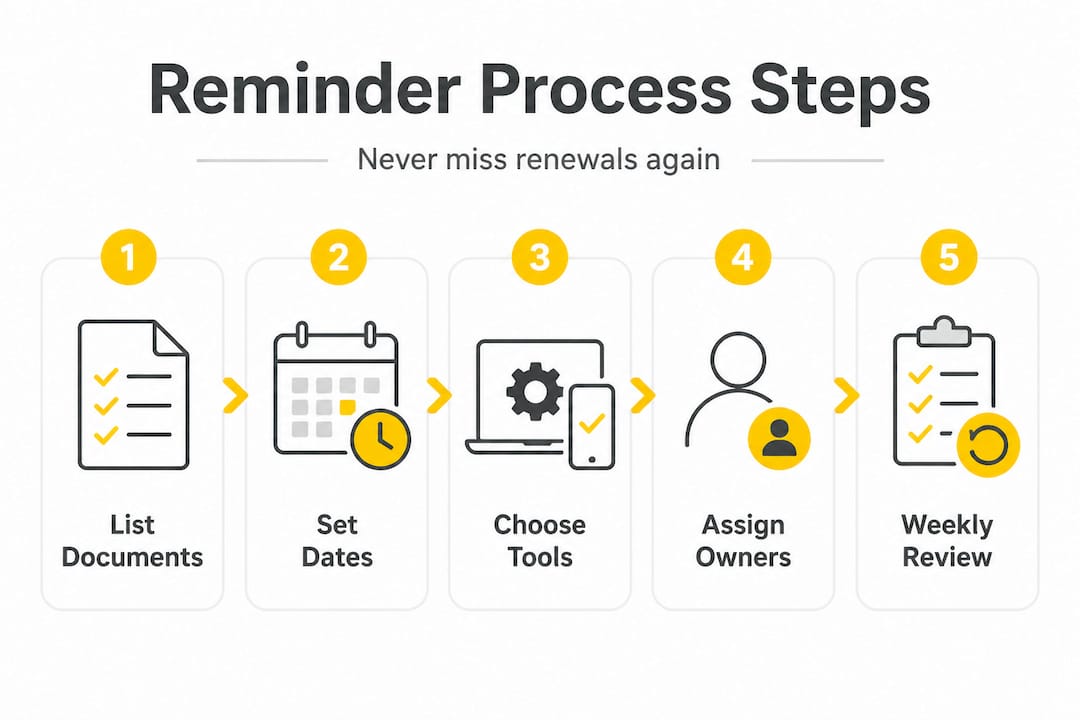
Here is a simple table to get you started:
| Document | Physical location | Digital backup | Next review date |
|---|---|---|---|
| Passports (all family members) | Filing cabinet, top drawer | Google Drive, "IDs" folder | 6 months before expiration |
| Car insurance policy | Glove compartment + filing cabinet | Email confirmation folder | Annual renewal date |
| Health insurance cards | Wallet + filing cabinet | Photo in phone | Open enrollment period |
| Children's school forms | School folder on desk | Scanned to Drive | Start of each school year |
| Wills and power of attorney | Fireproof safe | Attorney's office | Every 3 to 5 years |
| Vehicle registration | Glove compartment | Photo in phone | Annual renewal date |
| Prescription refill schedules | Medicine cabinet | Notes app | Monthly |
Once you have your inventory, use a document scanning app like Adobe Scan, Microsoft Lens, or even your phone's built-in scanner to create digital backups of every physical document. This serves two purposes. First, you have a backup if the original is lost or damaged. Second, you can access the information instantly when you need to verify a policy number or expiration date from anywhere.
Pro Tip: Keep a physical binder organized by category for emergencies, especially if you have tech-resistant family members like elderly parents or grandparents who need to access documents without a phone or computer. As organizing experts recommend, combining digital scanning and master inventories with calendar reminders for renewals, plus physical binders for emergencies, gives you the most complete safety net.
Choose the right reminder tools for your family
Once you know what needs to be tracked, it is time to match your family's needs with the best available tools.
Not every family operates the same way. A household where both parents are tech-comfortable and use smartphones daily has different needs than one where a grandparent is the primary caregiver and prefers paper. The good news is that you do not have to choose just one approach.
Here is a comparison of the main reminder tool categories:
| Tool type | Best for | Pros | Cons |
|---|---|---|---|
| Calendar apps (Google, Apple) | Tech-savvy adults | Automation, alerts, shareable | Requires device access |
| Dedicated family organizer apps | Households with multiple users | Shared lists, kid-friendly | Learning curve, subscription cost |
| Group chat reminders (text, WhatsApp) | Families already using group chats | No new app needed, immediate | Gets lost in conversation |
| Physical wall calendar | Tech-resistant members, visual learners | Always visible, no battery needed | Not portable, no alerts |
| Hybrid (digital plus physical) | Most families | Covers all bases, redundant | Requires upkeep of two systems |
When choosing your approach, consider these factors:
- Number of users: A single parent managing everything alone needs a different setup than a two-parent household with teenagers who can share responsibility.
- Daily routines: If your family checks a shared kitchen calendar every morning, that is a powerful anchor point. If everyone is on their phones, a shared app makes more sense.
- Device preferences: Some family members may only use one type of device, or none at all.
- Privacy: Medical documents and legal records may need restricted access rather than full household sharing.
- Age of children: Older kids can be assigned their own reminders for school forms and activity registrations.
A hybrid physical-digital approach is especially helpful for edge cases like tech-resistant elders or situations where power outages or device failures could leave you without access to critical information.
Pro Tip: When you set up any reminder, assign a named owner. Instead of "renew car insurance," write "Mom renews car insurance by March 15." This single change eliminates the most common cause of missed deadlines, which is everyone assuming someone else handled it. You can apply this principle across strategies for document reminders to make accountability automatic.
Set up and personalize your reminder system
With your tools ready, you can now implement your personalized process.
Setting up a reminder system feels like a big project, but breaking it into clear steps makes it manageable. Here is a step-by-step approach:
- Open your master inventory and identify every document with a deadline or renewal date within the next 12 months.
- Create a calendar event or app reminder for each item. Set the reminder to trigger 60 days before the deadline, then again at 30 days, and a final alert at 7 days.
- Label each reminder clearly with the document name, the action required, and the owner's name.
- Add a note to each reminder with the document's physical location and digital backup path so the owner can find it instantly.
- Share the calendar or app with all relevant household members. For a family organizer app, add each person to the shared household account.
- Create a paper backup for any critical deadlines. Write them on a physical calendar in the kitchen or a whiteboard where the whole family can see them.
- Test the system by checking that everyone received the shared calendar invites or app notifications and can see the upcoming reminders.
One of the most important elements of a successful setup is matching the reminder channel to each person's actual habits. If your co-parent never checks email but always responds to text messages, a group chat reminder will outperform an email calendar invite every single time. If your teenager uses a school planner, adding their activity registration deadlines there gives the reminder a natural home.
Visual timelines and externalized reminder systems are especially valuable for parents managing ADHD, because they reduce the cognitive load of keeping everything in working memory. When reminders live in a system rather than in your head, you free up mental energy for the actual tasks.
This principle, drawn from executive function research, is at the heart of systems like Getting Things Done (GTD), a productivity method that emphasizes capturing every commitment in a trusted external system. For parents and caregivers, the practical application is simple: if it is not written down with a date and an owner, it does not exist as a reliable commitment.
Pro Tip: Schedule a weekly 10-minute review, ideally on Sunday evening or Monday morning, to scan the next 30 days of reminders. This habit catches anything that slipped through and lets you adjust for schedule changes before they become emergencies. You can use setting up reminder alerts to make this review even faster with a centralized dashboard.
Verify, maintain, and troubleshoot your process
After setup, ongoing management is the secret to a process that truly works.

The most common reason reminder systems fail is not that they were set up wrong. It is that they were never updated after the initial setup. Life changes constantly. Insurance policies renew on different dates. Children move to new schools. Family members change phone numbers or switch devices. A reminder system that is not maintained gradually becomes unreliable, and unreliable systems get abandoned.
Here are the most common pitfalls families run into:
- Forgetting to update reminders after document changes: When you renew a passport or switch insurance providers, update the reminder immediately. Do not wait until the next review cycle.
- Relying on one person for everything: If the household's "organized parent" is traveling, sick, or overwhelmed, the whole system breaks down. Distribute ownership across multiple people.
- Ignoring expired alerts: When a reminder fires and the task gets delayed, reschedule the alert immediately rather than dismissing it. Dismissed alerts disappear and the deadline does not.
- Setting reminders too close to the deadline: A reminder that fires three days before a passport renewal does not give you enough time to gather documents, complete forms, and mail applications.
- Not syncing across devices: If reminders only live on one person's phone, the system has a single point of failure.
When something is not working, troubleshoot before abandoning the system entirely. Rotate reminder duty so a different family member owns the weekly review for a month. Add a redundant alert through a second channel. If digital reminders keep getting missed, add a physical backup. If the physical calendar is being ignored, try moving it to a more visible location or switching to a whiteboard.
Families who stick with robust reminder systems report sustained use over multiple years and a measurable reduction in missed renewals and deadlines. The key is treating the system as a living tool rather than a one-time setup project. Regular audits, shared ownership, and a willingness to adjust when something is not working are what separate families who stay on top of everything from those who are always scrambling.
You can simplify the maintenance process significantly by centralizing your reminders in one place. When all your document alerts, bill due dates, medication schedules, and school commitments live in a single system, the weekly review takes minutes instead of hours. Organizing document reminders in one centralized location is one of the highest-leverage changes most families can make.
Why most reminder processes fail and what actually works for busy families
Having walked through the ideal process, here is what experience and research say really moves the needle.
Most reminder systems fail for two reasons that have nothing to do with the tools themselves. The first is lack of owner clarity. When a reminder says "renew insurance," it belongs to no one, and no one acts on it. The second is inconsistent upkeep. A system that was perfect in January becomes outdated by April because no one updated it after the policy renewal changed dates.
The families who consistently avoid missed deadlines share three habits. They combine digital and physical reminder channels so there is always a backup. They make ownership explicit by naming a responsible person for every single item. And they build a regular review routine, even if it is just 10 minutes a week, so the system stays accurate.
There is also a deeper principle at work. GTD-style externalized reminder systems reduce cognitive load by moving commitments out of working memory and into a trusted system. For parents managing school schedules, medical appointments, bill due dates, and document renewals simultaneously, this is not a productivity trick. It is a mental health strategy.
The uncomfortable truth is that no tool, no matter how well-designed, works if the habits around it are broken. The best reminder app in the world fails if no one checks it. The most detailed physical binder fails if no one updates it. What works is the combination of a reliable tool, clear ownership, and a consistent review habit.
Pro Tip: If building a complete system feels overwhelming, start with just the next renewal coming up in the next 60 days. Set one reminder, assign one owner, and see how it feels. Then expand from there. You can build toward successful reminder strategies one document at a time.
Streamline your reminder process with ReMoe
For those who want a seamless solution, technology offers powerful support.
Managing medications, school schedules, bill due dates, and document renewals across a busy household is exactly the kind of challenge the ReMoe reminder app was built to solve. ReMoe brings your whole life into one place, so you never have to juggle multiple apps, paper calendars, and group chats to stay on top of what matters.
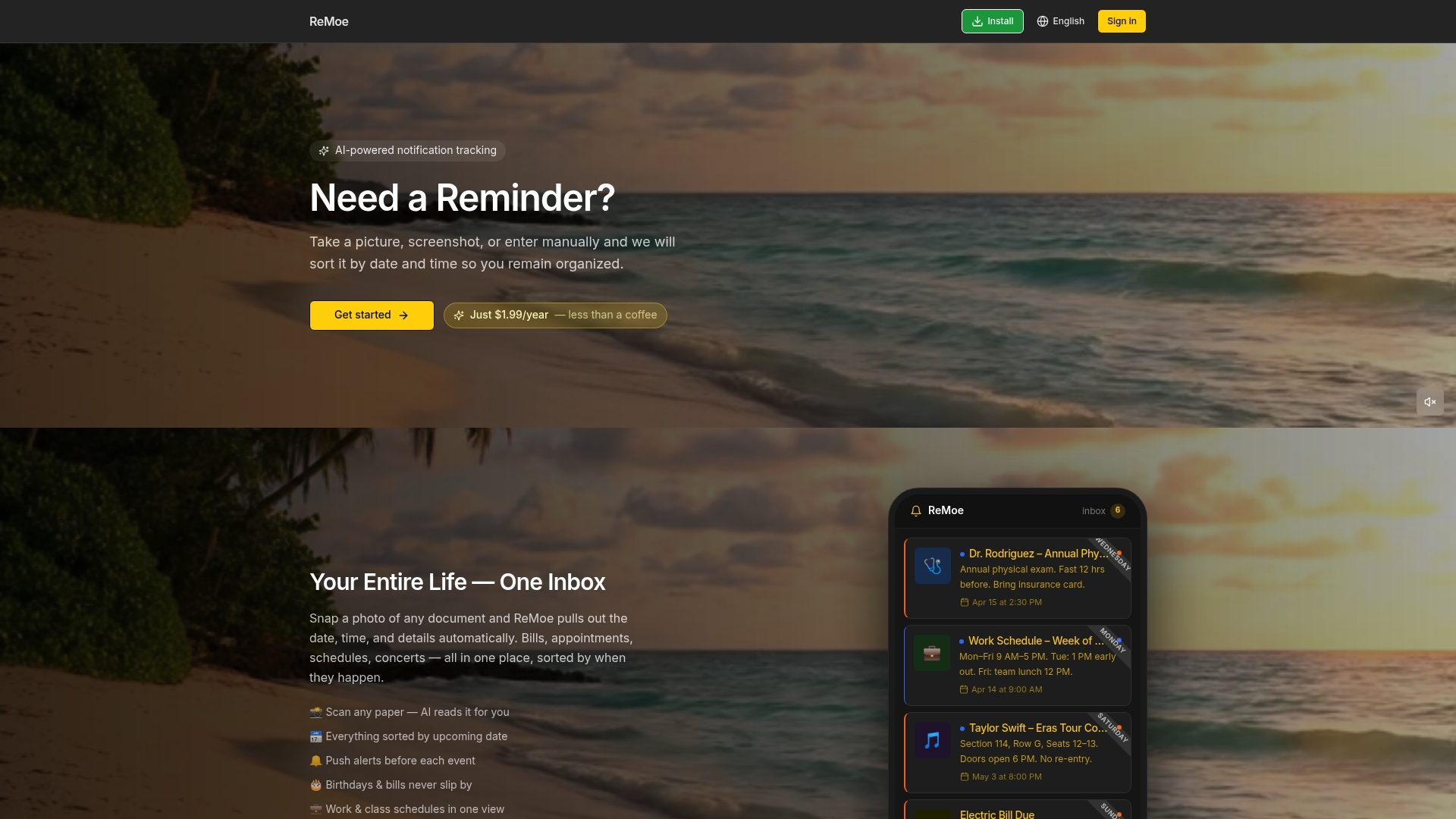
With ReMoe, you can set up document renewal reminders, medication schedules, bill due dates, and school commitments in minutes. Assign named owners for each reminder, share alerts across your household, and get notified through the channel that actually fits your routine. Whether you are a single parent managing everything alone or a household with multiple caregivers sharing responsibility, ReMoe gives you the peace of mind that comes from knowing nothing will slip through the cracks.
Frequently asked questions
What types of documents should families set reminders for?
Include IDs, passports, insurance policies, medical forms, school paperwork, and any document with a renewal or expiration date. As organizing experts note, combining digital inventories with calendar reminders covers the most critical categories.
How often should I review and update my reminder system?
A weekly audit keeps your reminder system accurate and prevents missed renewals. Executive function research supports building this as a consistent habit rather than an occasional check-in.
Are digital reminders enough, or should I also use paper backups?
A hybrid approach covers both tech-savvy and tech-resistant family members, making it more reliable. Family organizer reviews consistently highlight the value of physical-digital combinations for households with mixed tech comfort levels.
How can I assign responsibility for reminding others in the family?
List a named owner for each document in your reminders to avoid confusion. Executive function strategies show that named responsibility in externalized systems dramatically reduces the chance that a task falls through the cracks.