

Picture this: you have three sticky notes on the fridge, two reminder apps on your phone, a calendar on the wall, and a mental list you're constantly afraid of dropping. Despite all of it, you still miss the electric bill and forget a school pickup. Research confirms this isn't a personal failing. Juggling reminders across multiple platforms actively sabotages your memory. The good news is that consolidating everything into one place isn't just convenient — it's a scientifically supported strategy that frees up mental energy, reduces errors, and makes daily life feel genuinely manageable.
Table of Contents
- The chaos of scattered reminders
- How one-place reminders reduce mental load
- Why one-place reminders outperform alternatives
- Risks and common pitfalls of one-place reminder systems
- Making one-place reminders work for you
- What most articles miss about one-place reminders
- Ready to simplify your life with ReMoe?
- Frequently asked questions
Key Takeaways
| Point | Details |
|---|---|
| Less mental clutter | One-place reminders dramatically cut down context switches, improving focus and calm. |
| Higher task success | Digital unified reminder systems boost memory and reduce missed appointments or bills. |
| Customization is key | Optimal systems may blend one-place and split reminders for unique needs like work-life balance. |
| Backup matters | Avoid total reliance by ensuring backups, so no reminder gets lost if your main app fails. |
The chaos of scattered reminders
Most people don't realize how exhausting their reminder system actually is. A sticky note on the bathroom mirror. A phone alarm for medication. A calendar invite for the dentist. A mental note about the car insurance renewal. Each one lives in a different "place," and your brain has to remember where all the reminders even are before it can act on them.
This is what researchers call cognitive overload — when the mental effort of managing your tools rivals the effort of the actual tasks. Multi-reminder systems that are spread across apps, paper, and memory create a constant low-level drain on your focus. You're not just managing tasks. You're managing the system that manages your tasks.
Common signs your reminder setup is costing you:
- Missed bill payments because the due date was in two places and both got ignored
- Forgotten medication doses despite multiple phone alarms
- School schedule conflicts because your partner used a different calendar
- Appointments slipping through because a sticky note fell behind the counter
- The creeping anxiety that something important is about to be forgotten
"The more systems you use, the more mental effort you waste just navigating between them. Consolidation isn't laziness — it's efficiency."
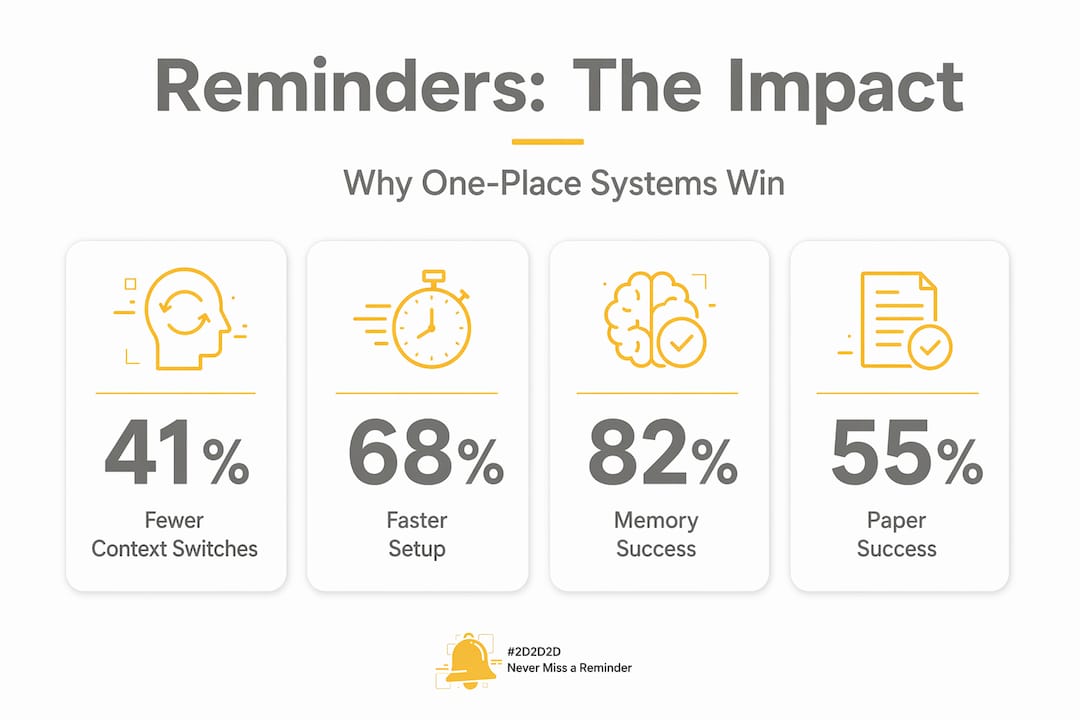
The data backs this up. Context switches dropped 41% and reminder setup time was cut 68% when users moved to a single platform in usability testing. That's not a small improvement. That's hours reclaimed every month, and a brain that's no longer burning energy just keeping track of the tracking system.
For parents and caregivers especially, this chaos compounds fast. You're managing your own schedule alongside a child's school events, medication schedules, and bill due dates for the household. The all-in-one reminders approach exists specifically because real life is complex, and simplicity at the system level creates breathing room everywhere else.

Now that we've set the scene, let's look at how consolidating reminders transforms organization for any busy lifestyle.
How one-place reminders reduce mental load
The term "cognitive offloading" sounds technical, but the concept is deeply practical. It simply means using something outside your brain, like an app, a calendar, or a physical note, to carry mental information so your working memory doesn't have to. The more effectively you offload, the more mental space you have for thinking, deciding, and being present.
Here's where one-place reminders pull ahead. When all your reminders live in a single system, the offloading is clean. There's no residual anxiety about which app you put that dentist appointment in, or whether you ever actually set the medication alarm. You check one place. You trust one place.
A 2024 Psychology and Aging study found that cognitive offloading via external reminders completely eliminates prospective memory deficits in older adults, equalizing performance across age groups. That means a well-designed reminder system doesn't just help younger, tech-savvy users. It genuinely levels the playing field for older adults and anyone managing high cognitive demands.
The benefits scale up even further for caregivers. People managing another person's medication schedule, appointments, and daily needs carry a double cognitive burden. When reminders for both their life and their care recipient's life are consolidated, the mental space freed by punctuality reminders becomes available for actual caregiving, not just logistics.
| Reminder approach | Memory success rate | Cognitive load | Error rate |
|---|---|---|---|
| No external reminders | ~55% | High | High |
| Paper diaries and notes | ~55% | Moderate to high | Moderate |
| Single digital platform | ~82% | Low | Low |
| Multiple mixed apps | Variable | High | Moderate to high |
Digital reminder tools like structured calendar apps improve prospective memory success to 82% compared to 55% for paper diaries, even in post-stroke patients. That's a 27-point improvement from switching formats and consolidating. For everyday users, the gains are likely just as meaningful.
Pro Tip: Combine event-based reminders (tied to a specific activity, like "after school pickup") with time-based reminders (like "3:00 PM Tuesday") in your one-place system. Research shows mixed cue reminders are especially effective under cognitive load.
Simplifying life with one-place reminders isn't about using less technology. It's about using technology smarter by reducing the friction between what you need to remember and actually remembering it.
With lower mental load comes more reliable memory — but how do one-place reminders outperform scattered approaches?
Why one-place reminders outperform alternatives
The difference between one-place and scattered reminder systems isn't just convenience. It shows up in real outcomes: missed deadlines, forgotten medications, bill penalties, and the stress that comes with chronic disorganization.
Mixed cue reminders improve prospective memory success under cognitive load, particularly for simple recurring tasks like taking medication or paying bills. This makes a consolidated platform with both time and event triggers significantly more reliable than a single-mode system.
Consider a parent managing a household of four. Monday has soccer practice, two bill due dates, and a pediatrician follow-up. Wednesday has a school spirit day, a prescription refill, and a work deadline. A scattered system means checking four different places before the week even starts. A home command center approach, whether physical or digital, consolidates all of this into one view, lowering mental load and reducing the chance anything gets missed.
How to transition from scattered to unified reminders:
- Spend 20 minutes doing a full audit. List every place you currently store reminders: apps, sticky notes, emails, mental lists, paper calendars.
- Choose one primary platform that supports time-based and event-based reminders with categories.
- Transfer all active reminders into the new system before removing them from old locations.
- Run both systems in parallel for one week, then fully commit to the primary platform.
- Schedule a monthly review to add, remove, or adjust reminders as your life changes.
Professionals can benefit just as much as parents. A salesperson tracking client follow-ups, a freelancer managing project deadlines, or a nurse tracking patient care schedules all face the same problem: too many inputs, not enough central structure. Boosting memory with multiple reminders is most effective when those reminders are organized within a single system rather than scattered across tools.
For caregivers specifically, role-based reminders reduce stress by separating "caregiver tasks" from "personal tasks" within the same platform, rather than forcing two entirely separate systems. Support for caregivers often highlights organizational tools as a frontline strategy for preventing burnout.
One-place reminders offer clear advantages, but there are important nuances and pitfalls to address.
Risks and common pitfalls of one-place reminder systems
Here's the part most productivity articles skip. One-place reminders are powerful, but they're not risk-free. Concentrating your entire organizational life into a single platform creates a single point of failure. If you lose access, the app goes down, or your phone breaks, you could miss critical reminders all at once.
Cognitive offloading strategies genuinely reduce internal cognitive load, but research also confirms that performance can suffer if the external aid suddenly disappears. Your brain, having offloaded those reminders, no longer has them memorized. That's the tradeoff, and it's worth managing.
Common pitfalls to watch for:
- Overloading the system. Adding every minor task dilutes the urgency of genuinely important reminders. Not everything deserves a notification.
- No offline backup. If your app requires an internet connection and you're offline or the service is down, those reminders vanish when you need them most.
- Not adapting as life changes. A reminder system built for summer doesn't automatically work for the school year. Regular reviews are essential.
- Trusting the system too much. For high-stakes reminders (medications, child safety, critical deadlines), a secondary backup isn't paranoia. It's smart design.
- Ignoring cognitive load from notifications. Too many reminders can recreate the overwhelm you were trying to escape. Quality beats quantity every time.
Pro Tip: Export or screenshot your full reminder list once a month and store it in a secure location like a cloud folder or printed sheet. This gives you a reliable reminder backup if your app ever becomes unavailable.
Personalized reminders matter here too. A system that fits how you actually think and operate is far more resilient than a generic setup. Some people need visual reminders. Others respond better to sound. Some need a single daily digest. Others want alerts spaced throughout the day. There's also evidence that cognitive strategies for focus can complement reminder systems by keeping you alert enough to actually act on them.
Now, let's see how to put one-place reminders into practice for everyday life.
Making one-place reminders work for you
Setting up a one-place reminder system isn't a one-afternoon project and then it's done. It's an ongoing practice. The goal is a system that feels almost invisible: it catches things before they slip, without demanding your attention constantly.
Step-by-step setup for any lifestyle:
- Identify your categories. Most people need at least four: health (medications, appointments), finances (bills, subscriptions), family or caregiving (school schedules, activities), and personal (self-care, goals).
- Choose a platform that supports all of them. Look for customizable alerts, recurring reminders, and easy access from multiple devices.
- Set up recurring reminders first. Bills, medications, and weekly tasks are the highest-value items to automate.
- Add one-time reminders for upcoming events. Think school picture day, car registration renewal, annual physicals.
- Assign each reminder to a category so you can scan quickly. A cluttered list with no structure is almost as bad as no list at all.
- Review the full system every 2 to 4 weeks. Remove outdated reminders and add anything new that came up.
Troubleshooting common sticking points:
- "I ignore my reminders." Try changing the delivery method. An audio alert you've tuned out can be replaced by a banner notification or a different tone.
- "I have too many and it feels overwhelming." Prune aggressively. If a reminder hasn't led to action in a month, reconsider whether it belongs in the system.
- "My partner or family doesn't use the same system." Shared calendars or shared reminder apps can solve this. The key is one shared view for household tasks.
- "I forget to check it." Build a habit anchor: check your reminders with your morning coffee, or right after you wake up each day.
For caregivers, central digital dashboards reduce repetition and stress while enabling the person you support to maintain more independence. When your system is reliable, everyone around you benefits, not just you. And when it comes to finances, a solid reminder system can stop you from missing bill deadlines that damage your credit or trigger unnecessary late fees.
With a personalized approach, one-place reminders can dramatically simplify your life. Let's highlight some deeper insights before you go.
What most articles miss about one-place reminders
Here's an honest take. The productivity world loves a universal prescription. "Put everything in one place!" sounds clean, repeatable, and marketable. But the most effective reminder system isn't necessarily a single app. It's the one that matches how your brain and life actually work.
For some people, strict separation between work and personal life is a mental health boundary, not an inefficiency. Keeping professional deadlines in a work tool and personal commitments in a personal app isn't fragmentation. It's intentional structure. The problem isn't having two systems. The problem is having seven uncoordinated ones.
What the research actually points to is metacognitive awareness: knowing how you remember things, when your memory is most fallible, and which reminders have the highest personal stakes. Someone who never misses calendar events but always forgets recurring bills doesn't need to overhaul their whole system. They need to reinforce the specific weak point.
The future of reminder efficiency isn't about finding the perfect app. It's about developing the self-awareness to know which tasks need reminders, which reminders need backups, and which notifications you've been ignoring for six months and should just delete. Multi-reminder system options exist on a spectrum, and the right point on that spectrum is individual.
Start with consolidation. Track what you miss. Adjust from there. That cycle — set up, observe, refine — will get you further than any app recommendation alone.
Ready to simplify your life with ReMoe?
If the idea of putting your whole life in one place sounds like exactly what you need, ReMoe was built for exactly that.
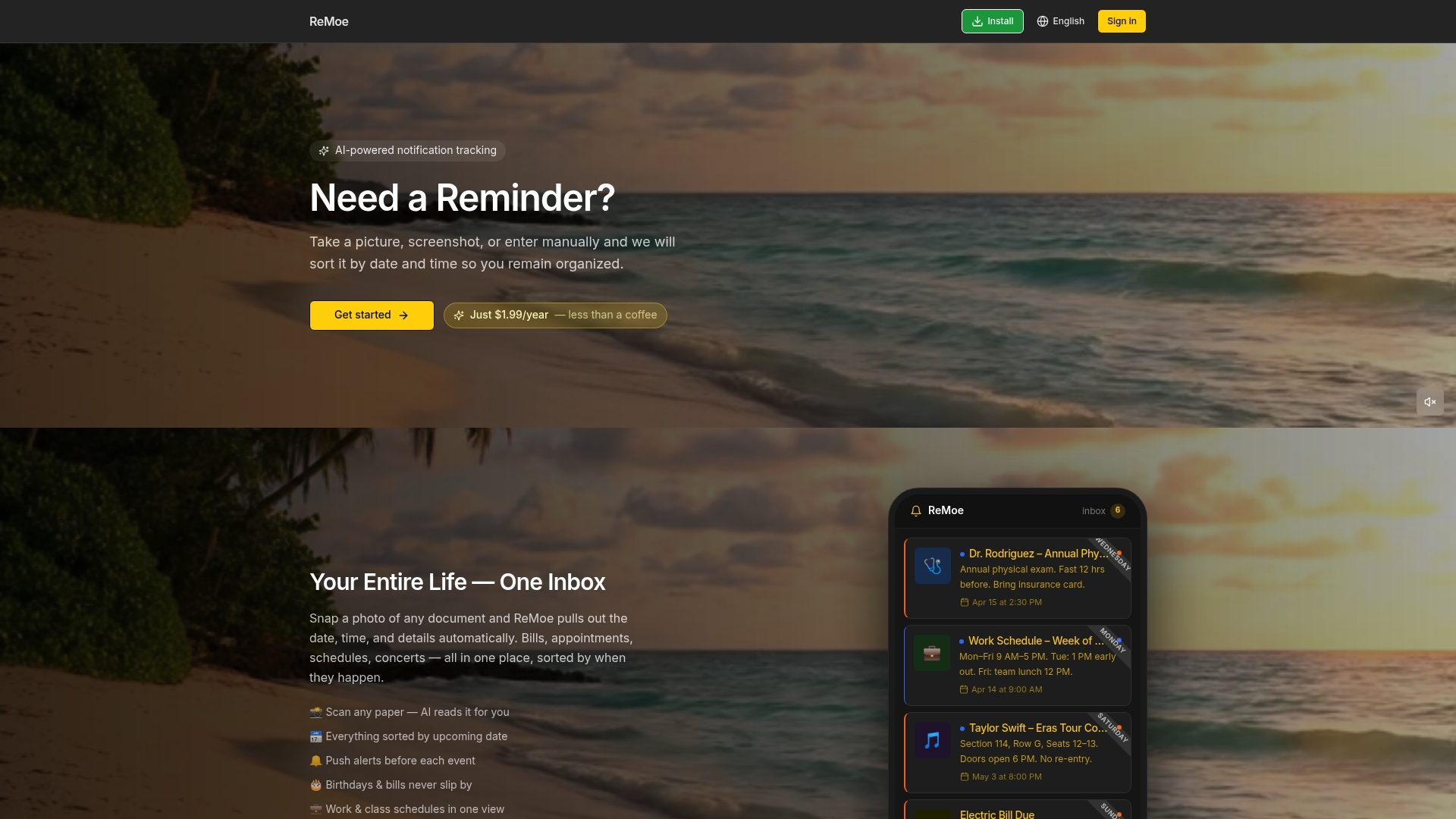
ReMoe consolidates the reminders that matter most: medication schedules, bill due dates, school events, child safety alerts, and daily personal tasks, all in one clean, easy-to-use platform. Setup takes minutes, and the pricing is designed so it's accessible for individuals and families alike. Whether you're a caregiver managing a loved one's care, a professional juggling work and home, or a parent holding a household together, ReMoe gives you the single, reliable hub your brain has been asking for. Head to ReMoe's special offer to see current plans and start simplifying today.
Frequently asked questions
How do one-place reminders improve productivity?
Consolidating reminders into one platform reduces context switching, saving time and mental energy — context switches drop 41% and setup time cuts 68% when users move from scattered tools to a single system.
Are digital one-place reminders more effective than paper for memory?
Yes. Digital reminders improve prospective memory success to 82%, compared to just 55% for paper-based diaries, even in patients with significant memory challenges.
What should I do if I lose access to my one-place reminder app?
Export your reminder list regularly and keep a physical or cloud backup, because cognitive offloading creates dependency on external aids, meaning lost access can cause real disruption to your recall.
Can one-place reminders benefit caregivers?
Absolutely. Home command centers lower mental load for caregivers and reduce missed deadlines by giving one shared view of all schedules, bills, and appointments.